
LetsGo2U Login Guide for Account Sign In
What You Need Before LetsGo2U Login
Prepare Your Account Credentials
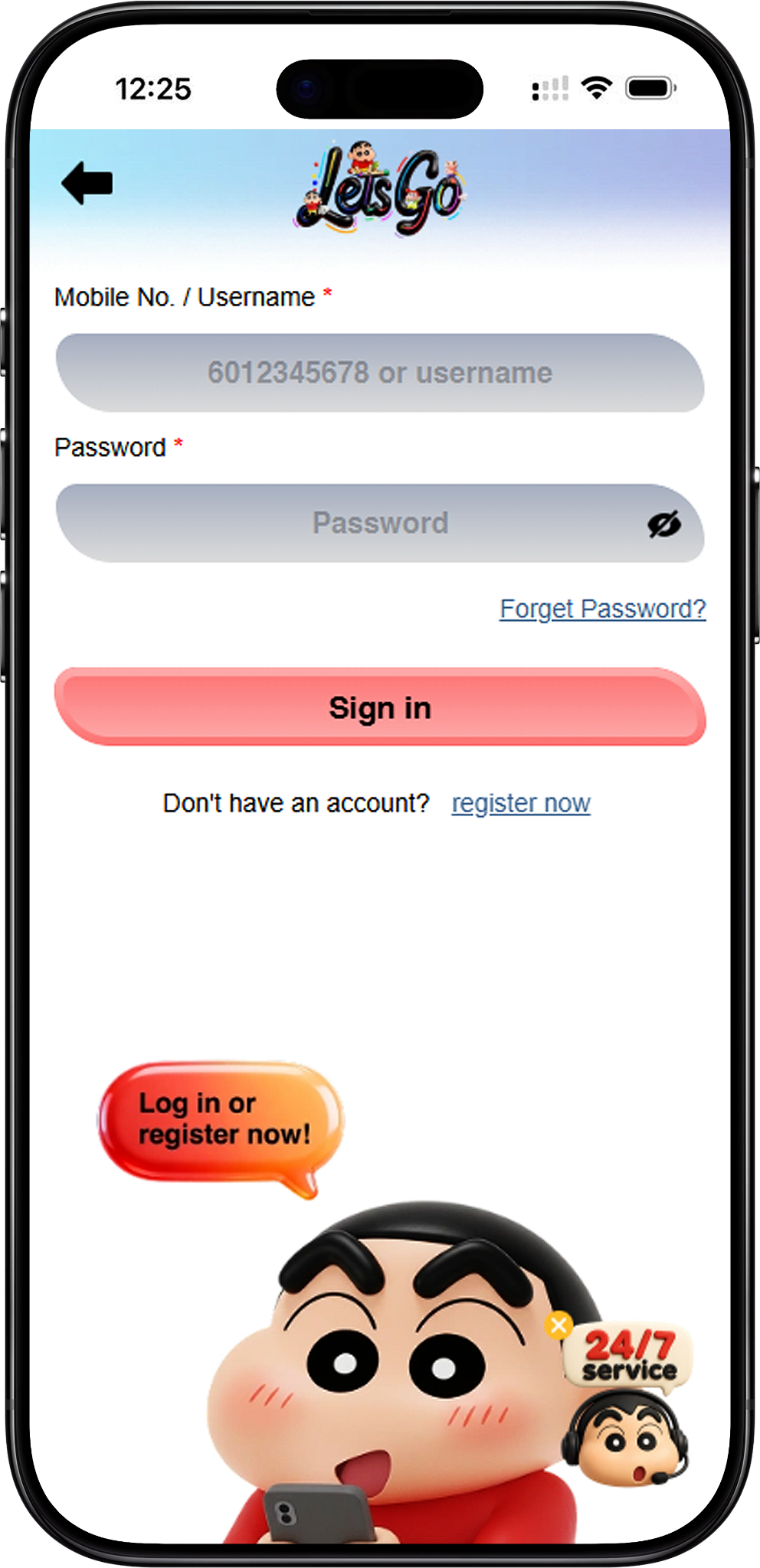
Before starting, have your registered mobile number or username and password ready. The supplied login screen accepts either a Mobile No. or Username in the first required field, followed by the account password.
Use an Existing Registered Account
The login form is intended for users who already have an account. If you have not completed registration, visit LetsGo2U Register (/en/register, internal link) and finish Sign Up before attempting to access the account.
LetsGo2U Login Steps
Step 1: Open the Login Page
Begin from LetsGo2U Home (/en, internal link) and select the Login option to reach the Sign In screen. Check that the page shows the Mobile No. / Username and Password fields before entering your credentials.
Step 2: Enter Your Mobile Number or Username
Type your registered mobile number or username into the first field. The example shown on the supplied screen indicates that either type of account identifier can be used for Sign In.
Step 3: Enter Your Password
Enter the password associated with your account in the Password field. Use the visibility control beside the password field when necessary to check your entry while keeping your credentials private in shared environments.
Step 4: Select Sign In
After reviewing both fields, select Sign in (login form action link) to submit your credentials. If the details match your registered account, you can continue to the available account area.
Step 5: Use Account Recovery If Necessary
If you cannot remember your ID or password, select Forget ID/Password? (password recovery link) instead of repeatedly entering uncertain credentials. The recovery page provides a phone-number-based password reset option.
Step 6: Register If You Do Not Have an Account
New users should select register now (/en/register, internal link) beneath the login form. Complete the required Sign Up and mobile verification process before returning to the Login page.
Sign In with Mobile Number or Username
Mobile Number Login
Existing users can enter the mobile number associated with their account in the Mobile No. / Username field. Enter the number carefully and make sure it corresponds to the account you intend to access.
Username Login
Users can also enter their registered username instead of a mobile number. This provides another way to access the same Sign In form when the username is easier to remember.
Password Entry
A password is required together with the selected account identifier. Check for typing errors before submitting the form, particularly if your device automatically inserts saved credentials.
Reset a Forgotten Password
Open the Password Recovery Page
From the Login screen, select Forget ID/Password? (password recovery link). The supplied recovery screen displays a Forget Password section with a phone-number field and a Reset Password button.
Enter Your Registered Phone Number
Enter the phone number associated with your account. The supplied example shows the Malaysian +60 country calling code, so users should check the displayed country code and phone number before continuing.
Select Reset Password
After entering the registered phone number, select Reset Password (password recovery action link) to continue the recovery process. Follow the instructions presented by the account recovery flow and only use a phone number connected to your own account.
Return to Login After Recovery
Once the password recovery process has been completed successfully, return to LetsGo2U Login (/en/login, internal link) and Sign In again using the updated account credentials.
Access LetsGo2U on H5 and Web
Web Account Access
The Login page can be used as the entry point for Web access through a compatible browser. Users should navigate through the Official platform rather than entering account credentials on unfamiliar pages.
H5 Browser Access
H5 access allows users to reach browser-based account functions without relying solely on an installed application. For other supported device options, visit LetsGo2U Download (/en/download, internal link) to review available App, APK, iOS, Android or Desktop access information.
Start from the Official Platform
Users who prefer to begin from the main platform can visit https://letsgo2uofficial.com and then navigate to the Login section. Checking the destination before entering credentials helps reduce the risk of using an unrelated page.
Login Safety and Account Checks
Check Your Credentials Before Submission
Review the mobile number or username and password before selecting Sign In. Small typing errors can prevent successful access, so confirming the account identifier first can avoid unnecessary login attempts.
Keep Your Password Private
Do not share your password with another person. If you are using a shared or public device, avoid leaving credentials visible and sign out after finishing your session.
Use Password Recovery When Needed
If you have genuinely forgotten your password, use the recovery function rather than repeatedly guessing. The supplied login screen provides a direct recovery route through the Forget ID/Password option.
Avoid Unrecognized Login Pages
Before entering your mobile number, username or password, confirm that you reached the intended account page through a trusted route such as the Home page or a known internal navigation link.
What to Do After Login
Explore Available Games
After successful account access, users can visit LetsGo2U Games (/en/games, internal link) to explore available Poker Games, Fishing, Sportsbook and 4D Lottery categories.
Review Promotions and Rewards
Users can check LetsGo2U Promotion (/en/promotion, internal link), Check In (/en/check-in, internal link), Spin (/en/spin, internal link), Quest (/en/quest, internal link) and Rank (/en/rank, internal link) for the relevant activities and applicable terms.
Manage Account Transactions
For account funding and cash-out information, users can review LetsGo2U Deposit (/en/deposit, internal link), LetsGo2U Withdraw (/en/withdraw, internal link) and LetsGo2U Rebate (/en/rebate, internal link) before carrying out the relevant action.
Review Referral Information
Users interested in referral or shareholder-related information can visit LetsGo2U Agent (/en/agent, internal link) to understand the available Agent features and related requirements.
Frequently Asked Questions About LetsGo2U Login
What can I use to Sign In?
The supplied login form allows users to enter either a registered mobile number or username together with their password.
Can I use my username instead of my phone number?
Yes. The first field is labelled Mobile No. / Username, indicating that either registered identifier can be used for account access.
What should I do if I forget my password?
Select Forget ID/Password? (password recovery link), enter the registered phone number on the recovery page and continue through the Reset Password process.
Does password recovery use my phone number?
Yes. The supplied recovery screen includes a phone-number field and shows the Malaysian +60 country calling code before the Reset Password button.
Can a new user use the Login page immediately?
A new user needs an account first. Select LetsGo2U Register (/en/register, internal link), complete the Sign Up process and then return to Login with the registered credentials.
Can I access the account through H5 or Web?
The login flow can support browser-based access through compatible Web or H5 environments. Users should start from a trusted platform route and verify the page before submitting account credentials.
Access Your LetsGo2U Account
Enter your registered mobile number or username and password to Sign In, or use the password recovery option if you cannot remember your credentials.